
Open source · macOS menu-bar agent
Your Mac's local AI, one keystroke away.
Press ⇧⌥Space and say what you need. Muon fixes your writing, explains errors, reads documents and screenshots, and tidies files, using models that run on your Mac. Free and MIT licensed.
macOS 26 · Apple Silicon · Apple Intelligence on · or brew install --cask harshdvaid24/tap/muon

- Simulator2.1 GB
- Chrome Helper1.4 GB
- Code Helper0.9 GB
How it works
Muon handles your Mac. The browser agent handles websites.
Muon works on its own. If you also install the browser agent, Muon passes website tasks to it, and it does them in a side panel next to the page.
It only thinks as hard as it has to.
Common requests (writing, documents, screenshots, cleanup, rules) are parsed directly, so they never depend on a model guessing. The rest goes to the smallest tier that can handle it.
Repeated requests replay from a small local cache. No model at all.
Apple's built-in model handles single steps, chat and all writing and explaining. No app memory used.
LM Studio (Qwen 3.5, MLX) by default plans multi-step work, reads images and very long text. Loads only when your Mac can spare it, then unloads. Or pick Ollama, any OpenAI-compatible server, OpenAI, Anthropic or Gemini.
Features
The everyday things you open a chatbot for, without leaving the app you're in.
Muon · Mac app
Fix your writing
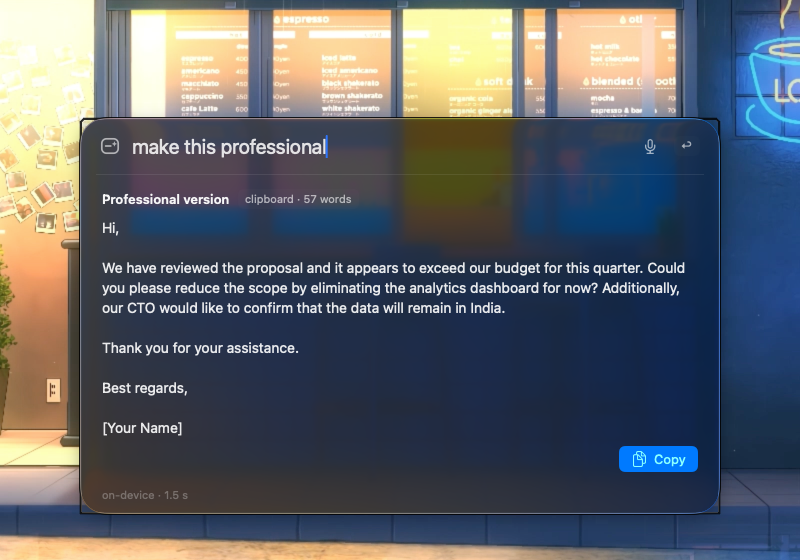
Copy text anywhere, ask “make this professional” or “fix grammar”. Paste puts the result back into the app you came from.
make this professional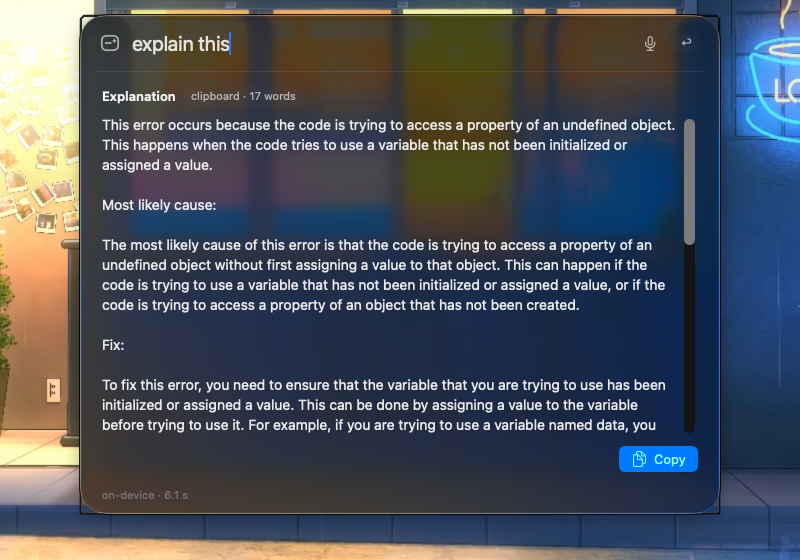
Explain errors and code
Copy a stack trace or a block of code and ask “explain this”. You get what it means and what to do next.
explain this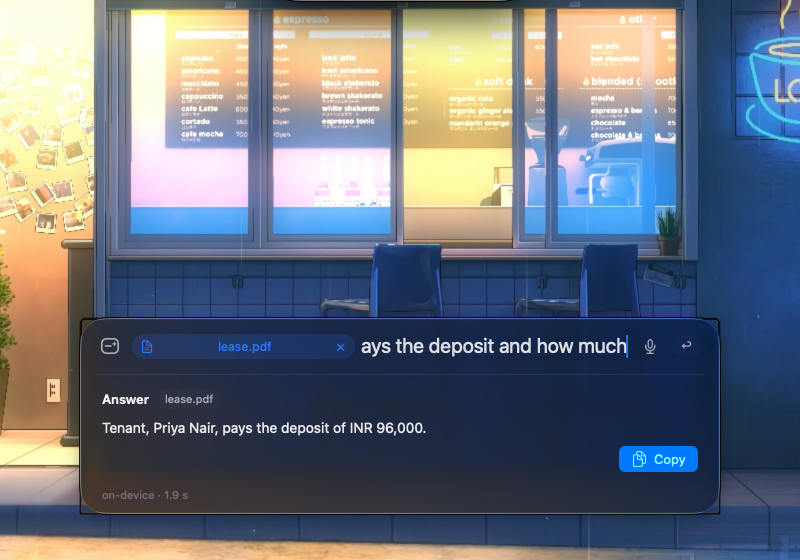
Ask your documents
Drop a PDF, .docx, .csv or image on the palette and ask about it. Scanned PDFs are read with on-device OCR.
who pays the deposit and how much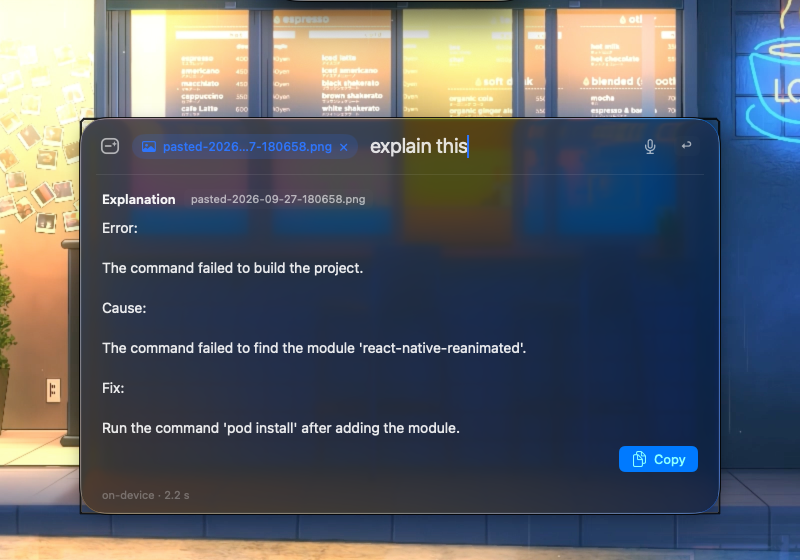
Screenshots, recordings, receipts
Explain a screenshot, turn a recording into meeting notes, total a folder of receipt photos into a CSV.
explain the error in this screenshot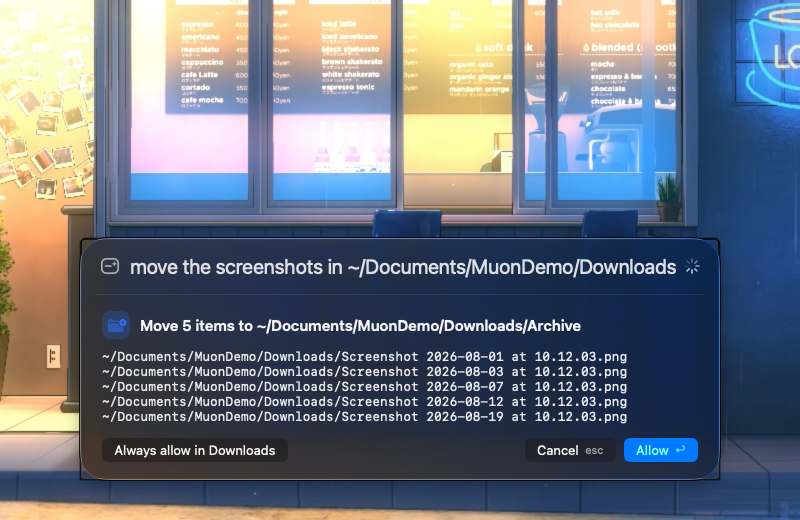
Files in allowed folders
Move, rename, find duplicates and large files, only inside folders you allow. It lists the exact files and asks once. Delete always means Trash.
move the screenshots in ~/Downloads into ~/Downloads/Archive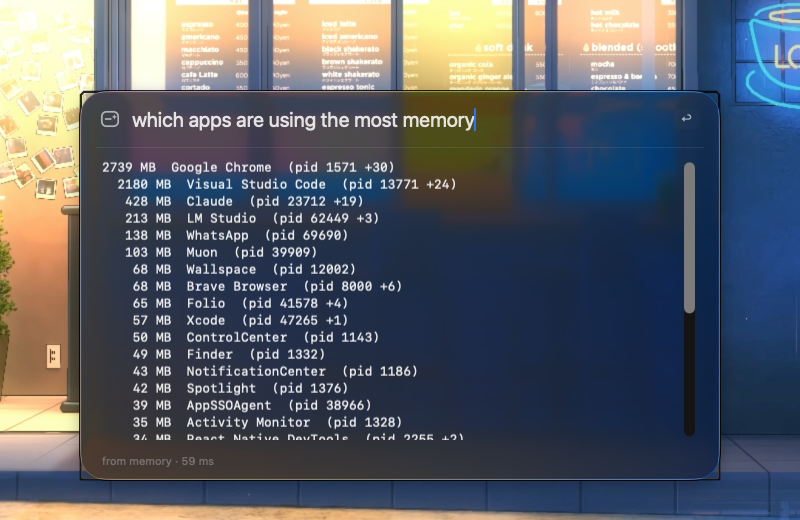
Find what slows your Mac
“what is eating my cpu” lists processes by CPU or RAM. Stopping one shows a confirmation card. System and other users' processes are never stopped.
which apps are using the most memory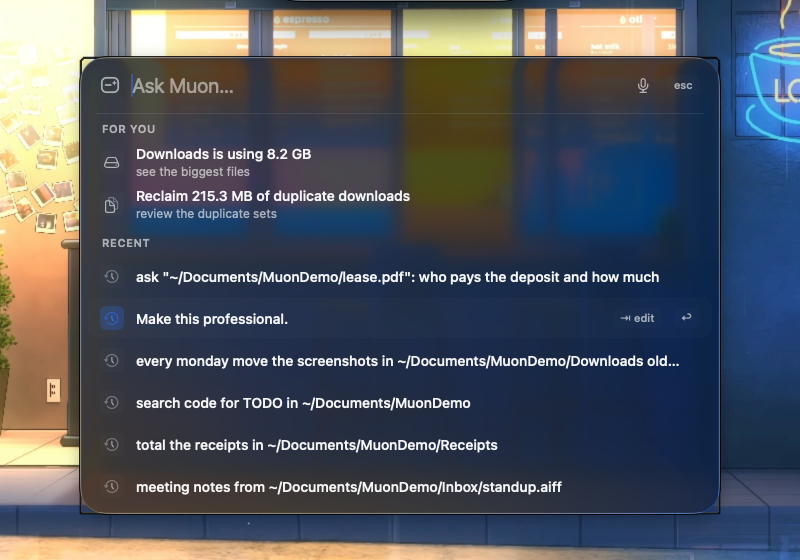
Memory of past requests
Anything you've asked before comes back in milliseconds from a capped local cache, with no model at all. It learns your project names too.
A desktop robot
A small draggable robot sits on your desktop. Click it to open Muon, right-click for options. It idles at 8 fps.
Voice, shortcuts, muon://
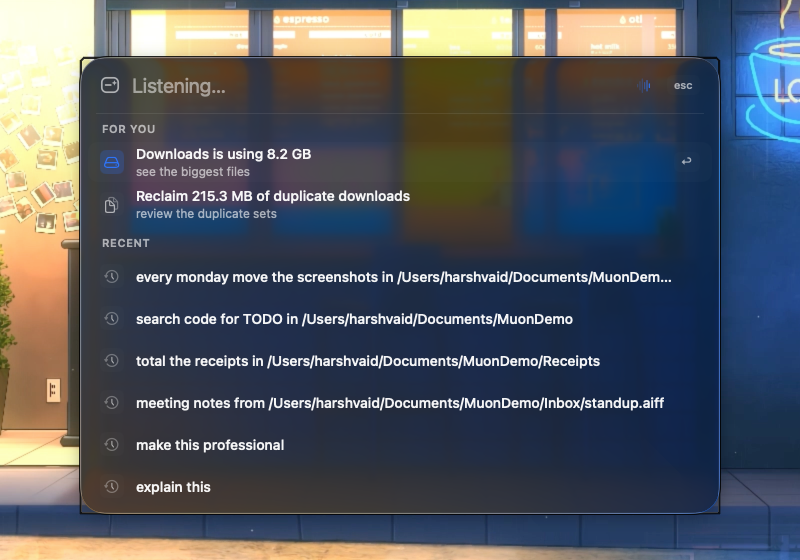
Press ⌘⇧M and speak. Call it from scripts or Raycast with muon://ask?q=…. Its Mac tools are a standard MCP server.
Muon · more of what it does · real screenshots
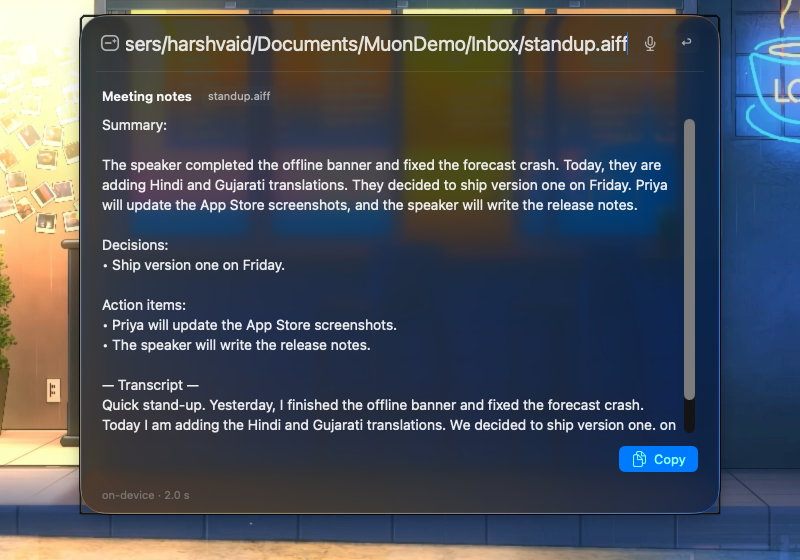
Meeting notes from a recording
Summary, decisions and action items from audio or video. Transcribed on-device.
meeting notes from ~/Downloads/standup.mp4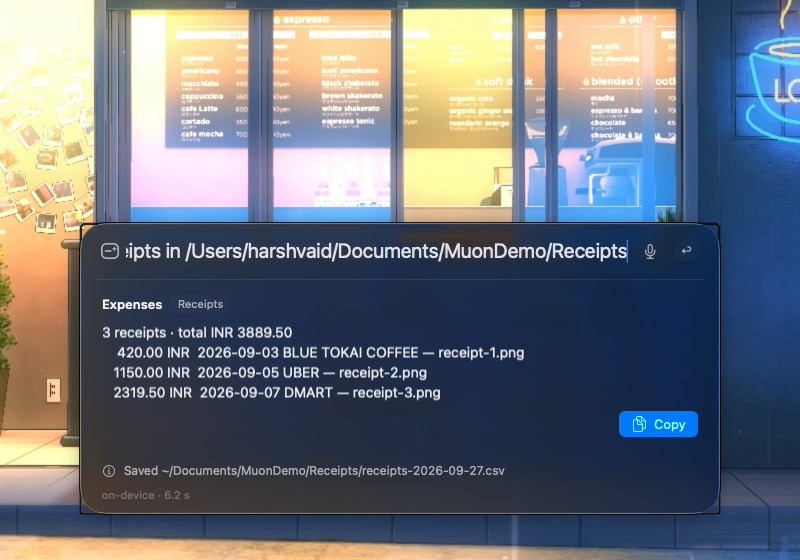
Receipts into expenses
Merchant, date and total per receipt, the sum, and a CSV saved after one confirmation.
total the receipts in ~/Documents/Receipts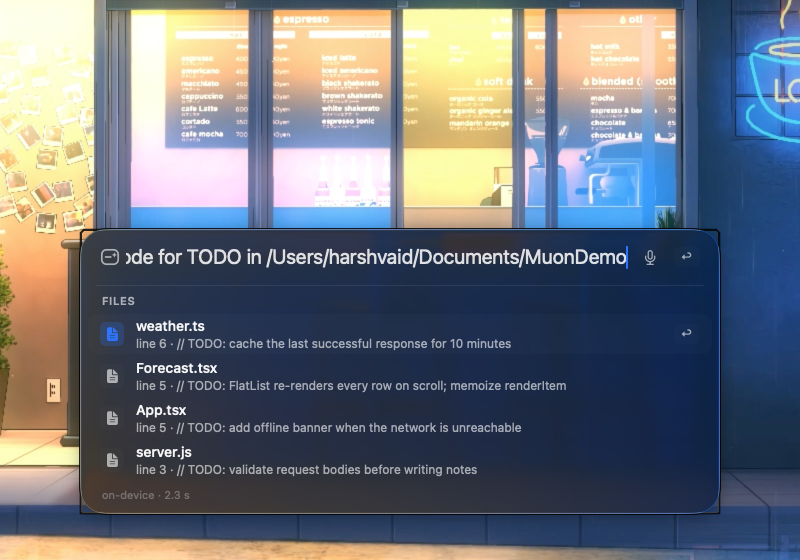
Developer chores
Code search, builds on simulators, git commits, Metro cache resets, crash explanations.
search code for TODO in ~/Projects/weather-app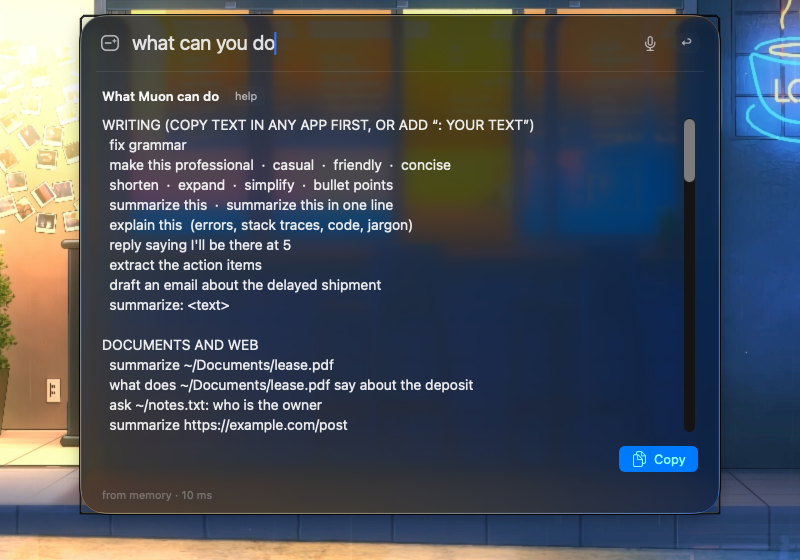
Ask what it can do
The whole catalog, inside the app, instantly. No model needed.
what can you do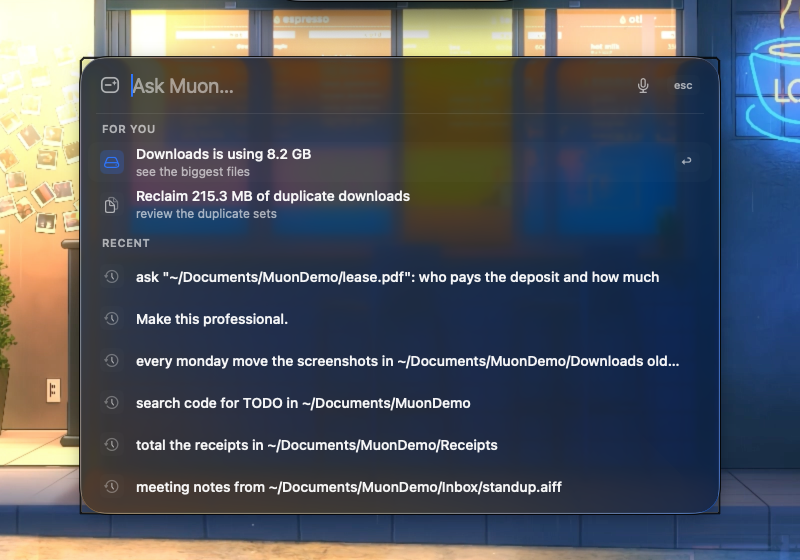
For you
Old screenshots to archive, how big Downloads has grown, duplicate space to reclaim, a crash to explain. Computed at most once a day, only when you open the palette.
⇧⌥Space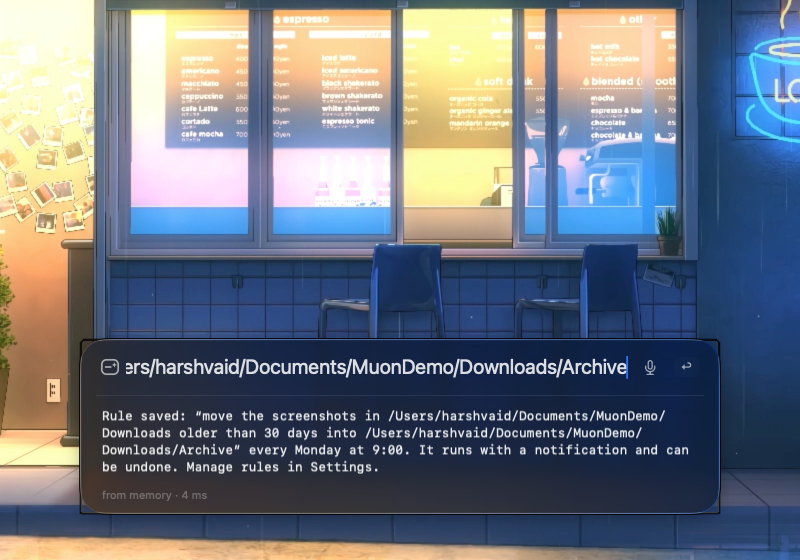
Rules and undo
A cleanup you have run three times is offered as a weekly rule. Rules run on wake with a notification. “undo” reverses the last automated move.
every monday move the screenshots in ~/Downloads older than 30 days into ~/Downloads/ArchiveMuon Browser Agent · browser extension · optional
Planner and navigator
One agent plans the steps, another acts on the page: clicks, typing, scrolling, switching tabs. Progress shows in the side panel.
Record once, replay
Record a workflow by doing it, then replay it later without calling a model.
Any model you like
Use a local model through LM Studio or Ollama, or a cloud provider with your own API key. Pick different models for planner and navigator.
An on-page robot
The same robot floats on the page and shows what the agent is doing. Hide it per site or turn it off.
Privacy and local models
Your text, documents and recordings stay on your Mac.
By default Muon sends nothing to a server unless you ask for something online: a web search, reading a web page, or opening a link. A cloud AI provider is used only if you pick one.
- Apple's on-device model firstMost requests are parsed without a model or answered from memory. The rest go to Apple's on-device model.
- A bigger local model only when neededMulti-step plans, images and very long text use Qwen 3.5 in LM Studio by default, or Ollama or any OpenAI-compatible server you run. A local model loads only when memory, heat and battery allow, and unloads after five idle minutes.
- No idle costAbout 56 MB in the menu bar, no background daemon, no model held in memory.
- Cloud is your choiceMuon, the browser agent and the browser-use engine use a cloud model only if you pick one and add your own API key, stored in your Keychain or the extension. With LM Studio or Ollama, everything stays local.
Built so a model can never do something you did not approve.
No shell, ever
Typed tools only, running allowlisted programs with argument lists.
Allowed folders only
~/Library, ~/.ssh, /System and other protected places are always refused.
You approve every change
Moves, renames, quits, builds, commits and saved files ask first. Releases get a system dialog.
Delete means Trash
Nothing is ever permanently deleted. Put Back always works.
The internet is a few named tools
Only web search, page reading and open-in-browser go online, and only when you ask.
Everything is logged
An audit log of every action. Paths only, never file contents.
Models and providers
Local by default. Bring a key if you want the cloud.
Muon (Mac app)
- Apple on-device model (local)
- LM Studio · Qwen 3.5 (local)
- Ollama (local)
- Any OpenAI-compatible
- OpenAI
- Anthropic
- Gemini
Apple's on-device model answers most requests. Bigger tasks use what you pick in Settings › AI provider: LM Studio by default (Qwen 3.5 9B, about 6 GB, with 4B as a low-memory fallback, about 3 GB). Outlined in cyan: runs on your Mac. OpenAI, Anthropic and Gemini need your own key, kept in your Keychain.
Browser agent (extension)
- LM Studio (local)
- Ollama (local)
- OpenAI
- Anthropic
- Gemini
- DeepSeek
- Grok
- Azure OpenAI
- OpenRouter
- Any OpenAI-compatible
Outlined in cyan: runs on your machine. Others need your own API key.
Compared
Built to act on your Mac without handing a model the keys.
The local agents people run on a Mac, from each project's own README on 28 September 2026. Muon is the newest and smallest of them; this is what it is built to be.
| Muon | OpenClaw | goose | Open Interpreter | AnythingLLM · Jan | |
|---|---|---|---|---|---|
| What it is | Menu bar agent for everyday Mac work | Personal assistant in your messaging apps, persistent Gateway daemon | General-purpose agent, desktop + CLI, MCP extensions | Coding agent forked from Codex | Private chat and RAG apps |
| How the model changes things | Never a shell. Typed tools, allowlisted binaries, path policy, one card per change, Trash not delete | “Tools run on the host … unless you configure sandboxing” | Shell and files via its developer extension; approval configurable | Commands in native sandboxing, with approvals | Do not act on the Mac |
| Everyday ask | 1–3 s on Apple's on-device model; repeats in ms | Model turns, your provider | Model turns, your provider | Model turns, your provider | Local chat, seconds or more |
| Idle cost | 56 MB, no model, no daemon | Gateway daemon always on | Desktop app | CLI while running | Model loaded while open |
| Needs a big model | No | Hosted or local | 15+ providers incl. Ollama | OpenAI-compatible providers | Yes, local |
| Your files and recordings | Stay on the Mac | Depends on provider | Depends on provider | Depends on provider | Stay on the Mac |
| Install | Download or brew cask | curl | bash or npm | Desktop app or script | curl | sh | Download |
Not for: hour-long autonomous tasks, chatting over WhatsApp, or being your coding agent. For that, Muon opens Claude Code, Codex, Gemini CLI or Aider in a VS Code window for the project you name.
Install
Start with the Mac app. Add the rest only if you want it.
Needs macOS 26 on Apple Silicon with Apple Intelligence on, and Node.js 20+ (brew install node). Optional: a local model for multi-step planning and images (step 2), Laya for faster routing. Check your setup with Muon --diagnose.
Muon for Mac
Download Muon.zip and move Muon.app to Applications, or use Homebrew. Needs macOS 26 on Apple Silicon with Apple Intelligence on, and Node.js 20+.
brew install --cask harshdvaid24/tap/muon
Muon isn't notarized yet. On first launch, open System Settings › Privacy & Security and click Open Anyway.
Download for macOSDownload the model with LM Studio
For multi-step plans, images and very long text. Install LM Studio, then get Qwen 3.5: 9B (about 6 GB) and the 4B low-memory fallback (about 3 GB).
Get LM Studiolms get qwen/qwen3.5-9b@4bit --mlx -y lms get qwen/qwen3.5-4b@4bit --mlx -y
Or search for them in LM Studio: qwen3.5-9b, qwen3.5-4b.
Muon › Settings › AI provider can also download the model for you.
Prefer Ollama? Get Ollama, run ollama pull qwen3:8b, then pick Ollama in Settings › AI provider.
Browser agent extension
For website tasks. Works in Chrome, Brave and Edge.
- Download the zip from the latest release and unzip it to a folder you will keep.
- Open chrome://extensions and turn on Developer mode.
- Click Load unpacked and pick that folder.
Open the side panel with Alt+Shift+B, then choose a model in Settings.
Download extension Build from sourcebrowser-use engine
A single-loop agent that runs in its own browser profile. Muon uses it for website tasks when it's installed, and falls back to the extension if it fails.
uv sync
./install-native-host.sh
Then pick it in Muon › Settings › Browser tasks, or in the extension under Settings › General › Agent engine.
Build it yourself
Xcode 26 and Node 20+.
git clone https://github.com/harshdvaid24/muon.git
cd muon/mac-tools && npm install && npm run build
cd .. && scripts/build.sh && scripts/run.sh
Ask it anything
Plain language. No syntax to learn.
A few things people ask. The full catalog covers writing, documents, screenshots, voice, expenses, crashes, developer chores, files, disk, apps and automation.
- fix grammar
- shorten
- reply saying I'll be there at 5
- extract the action items
- summarize ~/Documents/lease.pdf
- read the latest screenshot
- rename my screenshots
- transcribe ~/Downloads/call.m4a
- why did my app crash
- commit this
- run weather-app on iPhone 17
- clean the metro caches
- find duplicate files in ~/Downloads
- which apps are using the most memory
- in safari open a new private window
- undo
Open source
Read the code. Fork it. Built on good work by others.
Muon
github.com/harshdvaid24/muon
Apache-2.0Muon Browser Agent
github.com/harshdvaid24/muon-browser-agent
CreditNanobrowser
The browser agent is a fork of Nanobrowser's multi-agent extension and side panel.
Creditbrowser-use
Powers the optional browser-use engine.
Also thanks to LM Studio, Qwen, MLX, the Model Context Protocol SDKs, WXT and the Vercel AI SDK.